firmware links & manuals:
https://www.mesytec.com/downloads/firmware%20updates/firmware_VME.html
[Xilinx programmer]
for MADC32 & MTDC32
1. download newest firmware from mesytec.com
2. use graphical login on x86l-XXX machine
3. in tcsh:
source /fpga/Xilinx/legacy/14.7/ISE_DS/settings64.csh
impact
4. left-click on [boundary scan] in left list
5. right-click on central screen, select [Add Xilinx device]
6. select firmware file and [open]
special for MADC32:
7. in the Window “Select Device Part Name” choose xcf02s, then [OK]
8. connect cables with single pin adapter
9. right-click device logo, select [Set Programming Properties]
10. check [verify] and [design-spec. erase...] and click [apply] then [OK]
special for MTDC:
7. in the Window “Select Device Part Name” choose xcf16p, then [OK]
8. connect cables with mesytec adapter
9. right-click device logo, select [Set Programming Properties]
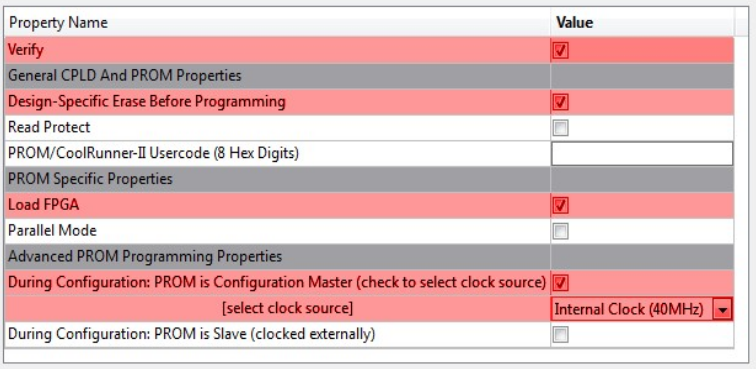
10. check items as shown below and press [Apply] and [OK]
11. go to [Output]->[Cable setup...] in top menue
12. select [Platform Cable USB/II] option, then [OK]
13. right-click device item and select [Program]
14. wait & done
special adapter needed!
[mvp program via USB]
for MVLC & MDPP
1. donwload latest fw
2. open |